



Offline-first mobile apps: when you need them and how they work
If your users work in basements, warehouses, trains or rural areas, an app that needs a connection fails them. Offline-first is the design that avoids that.
Most apps assume a connection and show a spinner when there is none. For some users that is acceptable. For others it makes the app useless at exactly the wrong moment.
Do your users really need it?
Ask where the app is used. Field staff, delivery drivers, inspectors, and sales teams in low-signal places do. Someone ordering food on home Wi-Fi mostly does not. Offline support is a real cost, so build it for a reason.
How it works
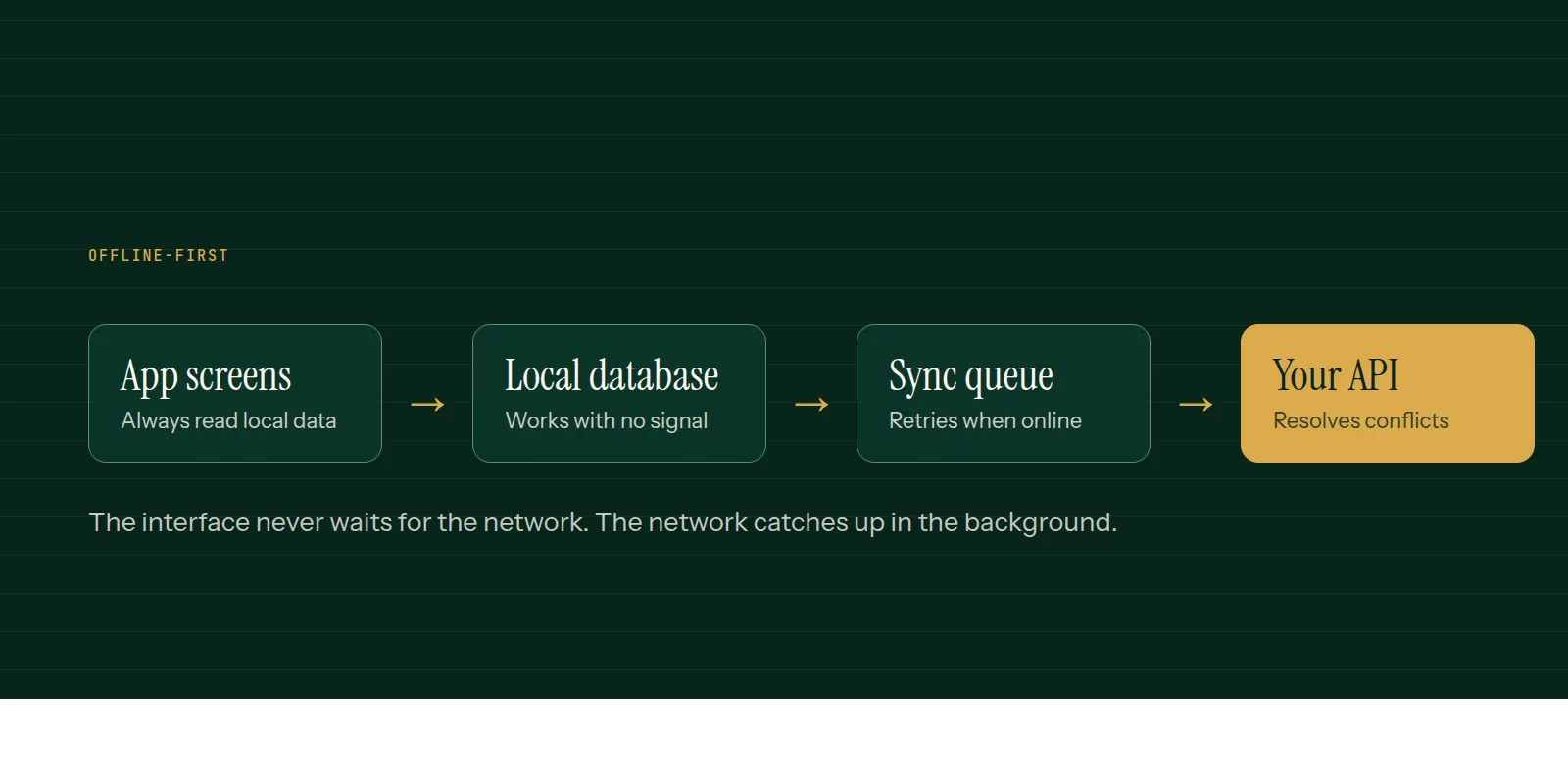
- A local database on the device holds the data the user needs, so screens load instantly and work without signal.
- Changes are written locally first, and the interface updates at once.
- A sync queue stores pending changes and sends them when the connection returns, retrying if it fails.
- The server accepts those changes and tells the app what changed elsewhere.
The hard part: conflicts
Two people edit the same record while offline. When both sync, something has to decide which version wins. Simple rules work for many apps: the latest edit wins, or each field is merged separately. Others need a human to choose. Decide this per kind of data before building.
Details that matter
- Make API calls safe to repeat, so a retry does not create duplicates.
- Show sync status so users know when their work has reached the server.
- Limit what is stored on the device to what the person needs.
- Test with airplane mode, slow networks and a connection that drops mid-sync.
Our mobile app development and API integration pages cover how we design this for field and operations apps.
Common questions
- What does offline-first mean?
- The app reads and writes to a local database first and syncs with the server in the background, so it works without a connection.
- Which apps need offline support?
- Field service, delivery, inspection, sales and any app used where signal is poor or unreliable. A casual app used on good Wi-Fi may not need it.
- Is offline-first harder to build?
- Yes. It adds local storage, a sync process and conflict rules, so it is worth building only when users need it.
This is what we do
Work of this kind is Mobile App Development and API & Integrations — the same hands that wrote this.
A guide from the team at RiverPoint Web & App. It describes how we would approach this and makes no measurement claims. If you want to talk it through, get in touch.